© 2017-2022 The original authors.
| Copies of this document may be made for your own use and for distribution to others, provided that you do not charge any fee for such copies and further provided that each copy contains this Copyright Notice, whether distributed in print or electronically. |
1. Introduction
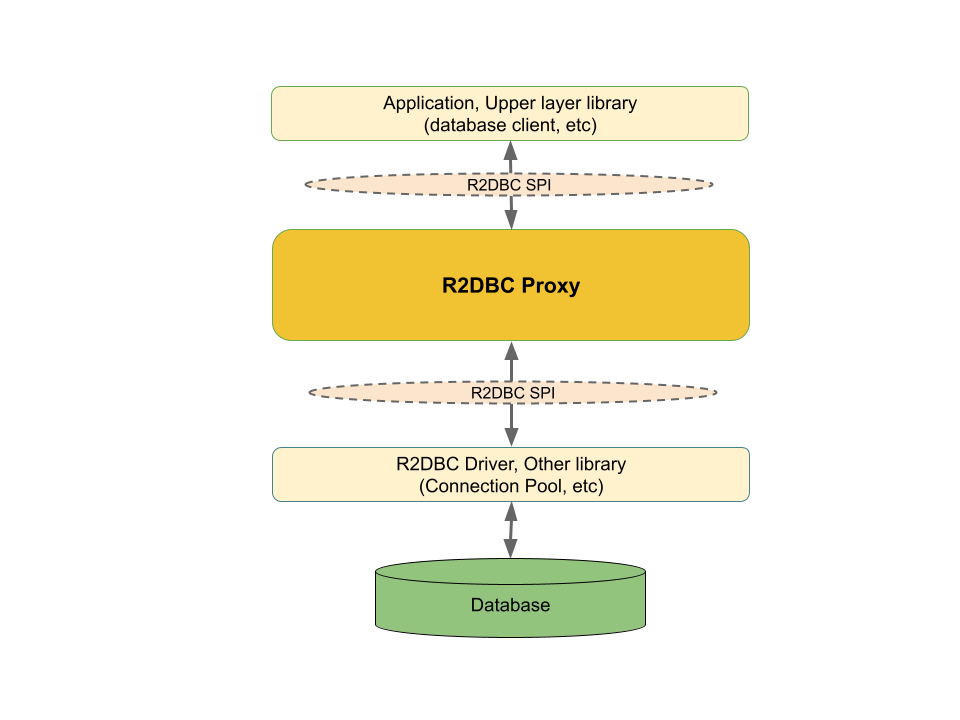
R2DBC Proxy is a proxy framework providing callbacks for query executions, method invocations, and parameter bindings.
The proxy holds proxy listeners. When a caller(application or upper layer library) interacts with the proxy, the registered proxy listeners receive callbacks.
Followings are the sample usages of the proxy listeners:
-
Logging on each query execution
-
Detect slow queries
-
Method tracing
-
Metrics
-
Distributed tracing
-
Assertion and verification
-
Own action
The proxy is a thin transparent layer which suits to implement cross-cutting concerns, agnostic to the underlying implementation such as drivers; yet, it is viewed as R2DBC SPI from the above layer.
1.1. Project Metadata
-
Version control: https://github.com/r2dbc/r2dbc-proxy
-
Issue tracker: https://github.com/r2dbc/r2dbc-proxy/issues
-
Release repository: https://repo1.maven.org/maven2
-
Snapshot repository: https://oss.sonatype.org/content/repositories/snapshots
2. Overview
R2DBC Proxy is a framework that generates proxies to R2DBC SPI objects via ProxyConnectionFactory
and provides callbacks to the method and query invocations.
R2DBC Proxy is a thin transparent layer. From callers(application or another library), proxies are simply viewed as R2DBC SPI objects. This is similar to how connection pooling is viewed from upper layer.
This section describes the key concepts of the R2DBC Proxy:
2.1. Proxies
Each SPI object(Connection, Statement, Batch, Result, and Row) created by ProxyConnectionFactory
is wrapped by a proxy.
When a caller invokes a method on the proxy, it triggers corresponding callback methods on the registered listeners.
2.2. Listeners
Listeners are the callback implementation.
Each listener implements the ProxyExecutionListener interface, which defines
[before|after]Query, [before|after]Method, and eachQueryResult methods.
When triggered, these callback methods receive contextual information as a parameter.
The MethodExecutionInfo is a parameter that contains the information about the invoked method, and the
QueryExecutionInfo holds the information of the query execution.
Users would write a listener implementation to perform custom actions.
2.3. Formatters
One of the main action performed by a listener is logging.
When a listener received a callback, the passed contextual information
requires a transformation to a String in order to be an entry for the logging.
Formatters are utility classes that covert MethodExecutionInfo and QueryExecutionInfo to String.
QueryExecutionInfoFormatter and MethodExecutionInfoFormatter are available out of the box
to transform QueryExecutionInfo and MethodExecutionInfo, respectively.
2.4. Converters
Converters are the callbacks that could alter the original invocation.
Currently, BindParameterConverter and ResultRowConverter are available.
They represent bind operations(Statement#[bind|bindNull]) and result row get operations(Row#get), respectively.
The converters can change the result, call alternative methods, or even not invoke the originally
called method.
3. Getting Started
3.1. Dependencies
Artifacts are available on Maven Central:
<dependency>
  <groupId>io.r2dbc</groupId>
  <artifactId>r2dbc-proxy</artifactId>
  <version>${version}</version>
</dependency>
If you’d rather like the latest snapshots of the upcoming major version, use the Maven snapshot repository and declare the appropriate dependency version.
<dependency>
  <groupId>io.r2dbc</groupId>
  <artifactId>r2dbc-proxy</artifactId>
  <version>${version}.BUILD-SNAPSHOT</version>
</dependency>

<repository>
  <id>sonatype-nexus-snapshots</id>
  <name>Sonatype OSS Snapshot Repository</name>
  <url>https://oss.sonatype.org/content/repositories/snapshots</url>
</repository>
3.2. Native Image Support
R2DBC Proxy supports GraalVM native-image. The proxy creation uses the JDK dynamic proxy by default. They need a configuration in the native image environment.
R2DBC proxy jar ships with the following configuration files:
-
META-INF/native-image/io.r2dbc/r2dbc-proxy/native-image.properties -
META-INF/native-image/io.r2dbc/r2dbc-proxy/proxy-config.json
The native image build automatically detects these embedded configuration files and sets up the dynamic proxy usage for R2DBC Proxy.
4. Setup
To obtain a proxy ConnectionFactory, R2DBC Proxy provides two mechanisms:
4.1. Connection Factory Discovery
R2DBC specifies two types of connection factory discovery, URL-based and
Programmatic.
R2DBC Proxy supports both with proxy as the driver identifier.
4.1.1. URL-based
When a connection URL contains proxy in its driver segment, ConnectionFactories
delegates the protocol segment(required) to the another connection
discovery.(pass-through) Then, it wraps the returned ConnectionFactory with a proxy.
r2dbc:proxy:<my-driver>://<host>:<port>/<database>[?proxyListener=<fqdn>]# with driver
r2dbc:proxy:postgresql://localhost:5432/myDB?proxyListener=com.example.MyListener
# with pooling
r2dbc:proxy:pool:postgresql://localhost:5432/myDB?proxyListener=com.example.MyListener&maxIdleTime=PT60S4.1.2. Programmatic
Another variant of the ConnectionFactory discovery is a programmatic creation of the ConnectionFactoryOptions.
Same as URL based discovery, when the DRIVER Option is proxy, it delegates PROTOCOL Option(required)
to another connection factory discovery request. The result of delegated discovery
request is wrapped by a proxy.
ConnectionFactory connectionFactory = ConnectionFactories.get(ConnectionFactoryOptions.builder()
   .option(ConnectionFactoryOptions.DRIVER, "proxy")
   .option(ConnectionFactoryOptions.PROTOCOL, "postgresql")
   .option(ConnectionFactoryOptions.HOST, "localhost")
   .option(ConnectionFactoryOptions.PORT, 5432)
   .option(ConnectionFactoryOptions.DATABASE, "myDB")
   .option(ProxyConnectionFactoryProvider.PROXY_LISTENERS, myListener)
   .build());

Mono<Connection> connection = connectionFactory.create();| Option | Description |
|---|---|
|
Must be |
|
Delegating connection factory driver |
|
Comma separated list of fully qualified proxy listener class names (Optional) |
When programmatically construct ConnectionFactoryOptions, in addition to the "comma separated listener class FQDN",
proxyListener option allows following values:
-
Proxy listener class (java
Classobject) -
Proxy listener instance
-
Collectionof above
4.2. Programmatic Proxy Construction
ProxyConnectionFactory provides a builder to construct a proxy ConnectionFactory.
The builder has methods to register concrete and adhoc listeners.
ConnectionFactory original = ...

ConnectionFactory connectionFactory = ProxyConnectionFactory.builder(original)
    .onAfterQuery(queryInfo ->
        ...  // after query callback logic
    )
    .onBeforeMethod(methodInfo ->
        ...  // before method callback logic
    )
    .listener(...)  // add listener
    .build();
5. Components
This section explains the main components of R2DBC Proxy.
5.1. ProxyConnectionFactory
This is the entry point to create a ConnectionFactory proxy.
The ProxyConnectionFactory#builder static method creates a Builder instance, which provides
methods to register listeners, configures the proxy, and generates a proxy ConnectionFactory.
ConnectionFactory original = ...

ConnectionFactory connectionFactory = ProxyConnectionFactory.builder(original)
    .onAfterQuery(queryInfo ->
        ...  // after query callback logic
    )
    .onBeforeMethod(methodInfo ->
        ...  // before method callback logic
    )
    .listener(...)  // add listener
    .build();
Alternatively, the connection factory discovery can create a proxy when driver name is the proxy.
5.2. ProxyConfig
Central configuration object for creating proxies.
A ProxyConfig instance holds the proxy related configurations, such as ProxyExecutionListener, ProxyFactory, or BindParameterConverter.
Any proxy objects created by a proxy ConnectionFactory share the same ProxyConfig instance.
ProxyConnectionFactory.Builder automatically creates a ProxyConfig internally.
It also takes a custom ProxyConfig in case you need a customization.
ProxyConfig proxyConfig = ...

ConnectionFactory connectionFactory = ProxyConnectionFactory.builder(original, proxyConfig)
    ...
    .build();
5.3. ProxyFactory
Strategy interface to create each proxy.
The default proxy factory implementation(JdkProxyFactory) uses JDK dynamic proxy for creating proxy objects.
Providing a custom ProxyFactory allows different proxy mechanism for constructing proxies. For example,
here is a sample code to
use ByteBuddy for proxy creation.
When you have a custom ProxyFactory implementation, ProxyConfig has a method to register it.
ProxyFactory myProxyFactory = ...

ProxyConfig proxyConfig = ProxyConfig.builder()
    .proxyFactoryFactory(() -> myProxyFactory)  // add ProxyFactory supplier
    .build();
5.4. ProxyExecutionListener
ProxyExecutionListener is the root listener interface which defines callbacks
for method invocation, query execution, and query result processing.
// invoked before any method on proxy is called
void beforeMethod(MethodExecutionInfo executionInfo);

// invoked after any method on proxy is called
void afterMethod(MethodExecutionInfo executionInfo);

// invoked before query gets executed
void beforeQuery(QueryExecutionInfo execInfo);

// invoked after query is executed
void afterQuery(QueryExecutionInfo execInfo);

// invoked on processing(subscribing) each query result
void eachQueryResult(QueryExecutionInfo execInfo);
Anytime a caller invokes a method on a proxy, it triggers method callbacks,beforeMethod() and afterMethod().
They receive a QueryExecutionInfo parameter which contains the contextual information about the invoked method.
The query execution methods, Batch#execute() and Statement#execute(), trigger query callbacks, beforeQuery()
and afterQuery(). (Specifically, it is called when returned result-publisher is subscribed.)
They receive QueryExecutionInfo parameter which holds the executing query information such as the query strings,
bound parameter values, duration of the query execution, etc.
While processing a Result object, eachQueryResult() receives a callback on each mapped query result at the
subscription of Result#map().
When a user has a custom ProxyExecutionListener implementation,
ProxyConnectionFactory.Builder has a method to register the listener.
In addition, the builder provides methods to directly register adhoc listeners.
ConnectionFactory original = ...

ConnectionFactory connectionFactory = ProxyConnectionFactory.builder(original)
    .onAfterQuery(queryInfo ->
        ...  // after query callback logic
    )
    .onBeforeMethod(methodInfo ->
        ...  // before method callback logic
    )
    .listener(...)  // add listener
    .build();
5.5. ProxyMethodExecutionListener
ProxyMethodExecutionListener is an extension of ProxyExecutionListener.
In addition to the methods defined in ProxyExecutionListener, ProxyMethodExecutionListener has explicit
before/after methods for all methods defined on ConnectionFactory, Connection, Batch,
Statement, and Result.
Method names are based on the rule: "[before|after]<method-name>On<class-name>".
For example, if you want to perform an action at the creation or close of a connection:
public class ConnectionStartToEndListener implements ProxyMethodExecutionListener {

  @Override
  public void beforeCreateOnConnectionFactory(MethodExecutionInfo methodExecutionInfo) {
    // called before ConnectionFactory#create()
  }

  @Override
  public void afterCloseOnConnection(MethodExecutionInfo methodExecutionInfo) {
    // called after  Connection#close()
  }

}
5.6. Formatters
One of the typical usages of the proxy listener is logging a contextual information. For example, when a query runs, logs the query string, parameters, success/failure result, query execution time, thread, etc.
Each callback method on ProxyExecutionListener receives contextual information - QueryExecutionInfo and MethodExecutionInfo.
To perform logging, you need to transform [Method|Query]ExecutionInfo to the logging entries in a format of the String.
Formatter classes fill this gap. QueryExecutionInfoFormatter and MethodExecutionInfoFormatter are available out of the box.
They provide user-friendly conversion methods, which transform selectively or all data in
the [Method|Query]ExecutionInfo to a String with a default or customized format.
5.6.1. QueryExecutionInfoFormatter
This class converts QueryExecutionInfo to String.
// convert all info
QueryExecutionInfoFormatter formatter = QueryExecutionInfoFormatter.showAll();
String str = formatter.format(queryExecutionInfo);

// convert it
String str = formatter.format(queryExecutionInfo);
5.6.2. MethodExecutionInfoFormatter
This class converts MethodExecutionInfo to String.
MethodExecutionInfoFormatter formatter = MethodExecutionInfoFormatter.withDefault();

// register as adhoc listener
ProxyConnectionFactoryBuilder.create(connectionFactory)
  .onAfterMethod(execInfo ->
     System.out.println(formatter.format(execInfo)))  // convert & print out to sysout
  .build();
5.6.3. Customizing Formatter
QueryExecutionInfoFormatter and MethodExecutionInfoFormatter hold a list of consumers internally and loop
through them to populate the output StringBuilder.
Each consumer simply converts a portion of the [Query|Method]ExecutionInfo to StringBuilder.
Formatting is customizable by toggling builtin converters and registering new consumers.
// customize conversion
QueryExecutionInfoFormatter formatter = new QueryExecutionInfoFormatter();
formatter.addConsumer((execInfo, sb) -> {
  sb.append("MY-QUERY-EXECUTION="); // add prefix
};
formatter.newLine();  // new line
formatter.showSuccess();
formatter.addConsumer((execInfo, sb)  -> {
    // custom conversion
    sb.append("MY-ID=" + executionInfo.getConnectionInfo().getConnectionId());
});
formatter.showQuery();

// convert it
String str = formatter.format(queryExecutionInfo);
5.7. BindParameterConverter
BindParameterConverter is a callback interface for bind parameter related operations - Statement#bind and Statement#bindNull.
The callback is performed before calling the actual bind parameter operations. This converter can change the actual behavior of the bind parameter operations. For example, a converter can transform the bind markers.
Please see more details on the "gh-26: Proxy mechanism to support converting bind marker" github issue.
5.8. ResultRowConverter
ResultRowConverter is a callback interface for result row get(Row#get) operations.
The callback is performed before calling the actual Row#get operation.
This converter can alter the actual behavior of the invoked Row#get method.
To use the converter, register it to the ProxyConfig.
ResultRowConverter converter = ...
ProxyConfig proxyConfig = ProxyConfig.builder().resultRowConverter(converter).build();

// create a proxy ConnectionFactory
ConnectionFactory proxy = ProxyConnectionFactory.builder(connectionFactory, proxyConfig).build();
Sample usages:
6. Use cases
6.1. Query logging
At the query executions, registered proxy listeners receive query callbacks,
[before|after]Query methods with QueryExecutionInfo parameter.
This parameter contains contextual information about the query execution, such as query string, execution type, bindings, execution time, etc.
With the QueryExecutionInfoFormatter, which converts QueryExecutionInfo to String, users can easily
perform query logging.
# Statement with no bindings
#
Thread:reactor-tcp-nio-1(30) Connection:1
Transaction:{Create:1 Rollback:0 Commit:0}
Success:True Time:34
Type:Statement BatchSize:0 BindingsSize:0
Query:["SELECT value FROM test"], Bindings:[]

# Batch query
#
Thread:reactor-tcp-nio-3(32) Connection:2
Transaction:{Create:1 Rollback:0 Commit:0}
Success:True Time:4
Type:Batch BatchSize:2 BindingsSize:0
Query:["INSERT INTO test VALUES(200)","SELECT value FROM test"], Bindings:[]

# Statement with multiple bindings
#
Thread:reactor-tcp-nio-1(30) Connection:3
Transaction:{Create:1 Rollback:0 Commit:0}
Success:True Time:21
Type:Statement BatchSize:0 BindingsSize:2
Query:["INSERT INTO test VALUES ($1,$2)"], Bindings:[(100,101),(200,null(int))]
6.1.1. Sample Configuration
To perform query logging:
-
Create a
QueryExecutionInfoFormatter -
Use the formatter in after-query callback to convert
QueryExecutionInfoto aStringlog entry. -
Pass it to the logger.
The before query callback(beforeQuery) can also perform query logging; however, some attributes are only
available in the after query callback(afterQuery) such as execution time, success or failure,
result count, etc.
QueryExecutionInfoFormatter formatter = QueryExecutionInfoFormatter.showAll();

ConnectionFactory proxyConnectionFactory =
  ProxyConnectionFactory.builder(connectionFactory)    // wrap original ConnectionFactory
                                                       // on every query execution
    .onAfterQuery(execInfo ->
      logger.info(formatter.format(execInfo));         // convert & log
    .build();
6.2. Slow Query Detection
There are two types of slow query detections - preemptive and non-preemptive.
-
Preemptive: detect slow queries WHILE they are running.
-
Non-preemptive: detect slow queries AFTER they have executed.
The "non-preemptive" slow query detection is simple. On afterQuery callback, check the query execution time.
If it took more than your threshold, perform an action such as logging, send notification, etc.
For the "preemptive" slow query detection, you may create a watcher that checks the running queries and notifies
ones that have exceeded the threshold.
In datasource-proxy, SlowQueryListener is implemented this way.
6.2.1. Sample Configuration (Non-preemptive)
On after query execution, check whether the query execution time has exceeded the threshold time, then perform an action.
Duration threshold = Duration.of(...);

ConnectionFactory proxyConnectionFactory =
  ProxyConnectionFactory.builder(connectionFactory)  // wrap original ConnectionFactory
    .onAfterQuery(execInfo -> {
       if(threshold.minus(execInfo.getExecuteDuration()).isNegative()) {
         // slow query logic
       }
    })
    .build();
6.3. Method Tracing
When a caller invokes a method on the proxy classes(ConnectionFactory, Connection, Batch, Statement, or Result),
the registered listeners receive callbacks before and after the target method invocation.
By logging each contextual information of the invoked method, essentially this shows the caller’s interactions with R2DBC SPI objects.
  1: Thread:34 Connection:1 Time:16  PostgresqlConnectionFactory#create()
  2: Thread:34 Connection:1 Time:0  PostgresqlConnection#createStatement()
  3: Thread:34 Connection:1 Time:0  ExtendedQueryPostgresqlStatement#bind()
  4: Thread:34 Connection:1 Time:0  ExtendedQueryPostgresqlStatement#add()
  5: Thread:34 Connection:1 Time:5  PostgresqlConnection#beginTransaction()
  6: Thread:34 Connection:1 Time:5  ExtendedQueryPostgresqlStatement#execute()
  7: Thread:34 Connection:1 Time:3  PostgresqlConnection#commitTransaction()
  8: Thread:34 Connection:1 Time:4  PostgresqlConnection#close()
6.3.1. Sample Configuration
At [before|after]Method callbacks, perform an action such as printing out the invoked method,
creating a span, or updating metrics.
MethodExecutionInfoFormatter converts the MethodExecutionInfo to String for creating a logging entry.
MethodExecutionInfoFormatter methodExecutionFormatter = MethodExecutionInfoFormatter.withDefault();

ConnectionFactory proxyConnectionFactory =
  ProxyConnectionFactory.builder(connectionFactory)  // wrap original ConnectionFactory
    // on every method invocation
    .onAfterMethod(execInfo ->
      System.out.println(formatter.format(execInfo)))  // print out method execution (method tracing)
    .build();
```
6.4. Metrics
On method or query callbacks, update the metrics with the provided contextual information.
For example:
-
Number of opened connections
-
Number of rollbacks
-
Method execution time
-
Number of queries
-
Type of query (SELECT, DELETE, …)
-
Query execution time
-
etc.
6.4.1. Sample Implementation
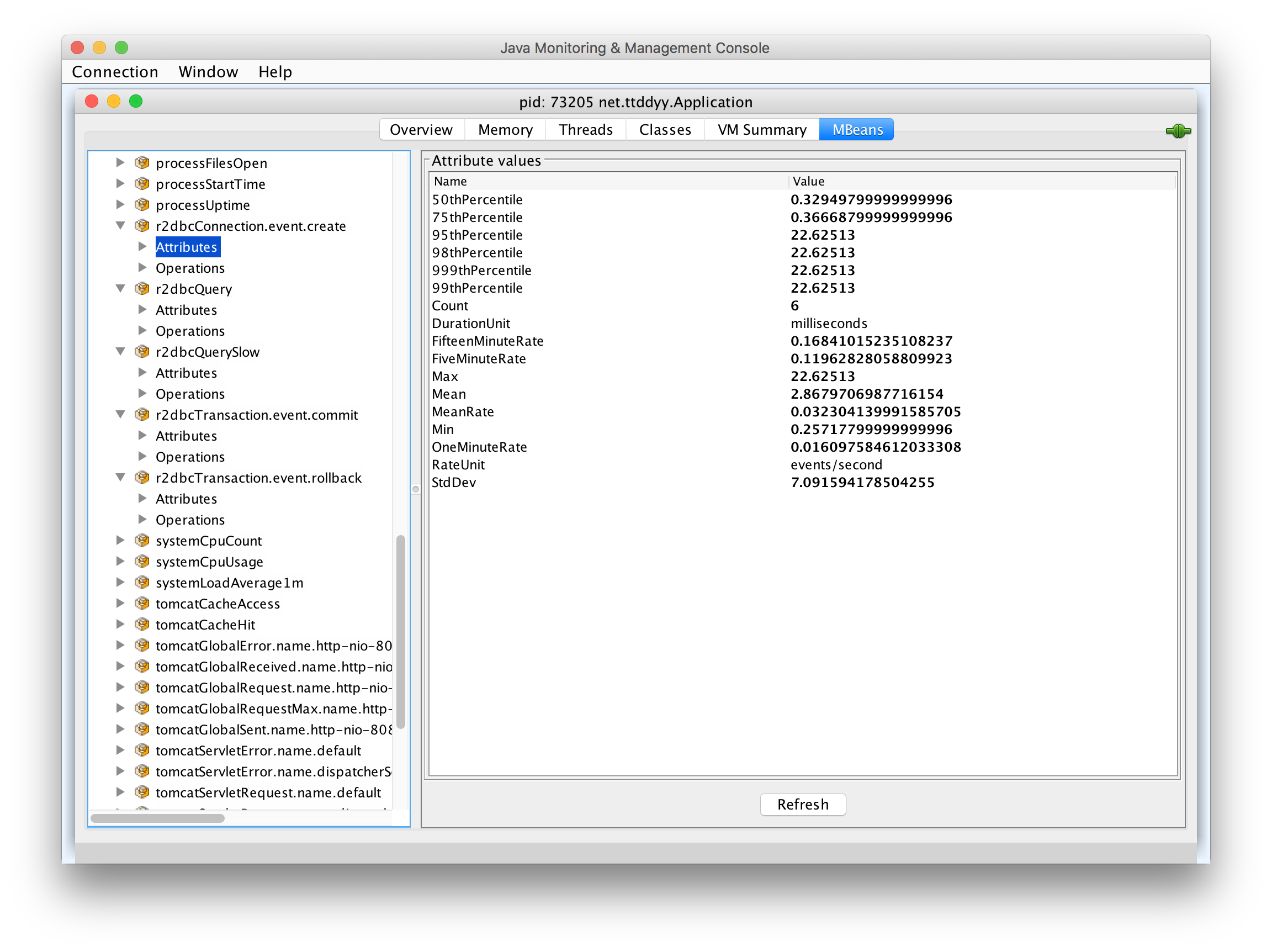
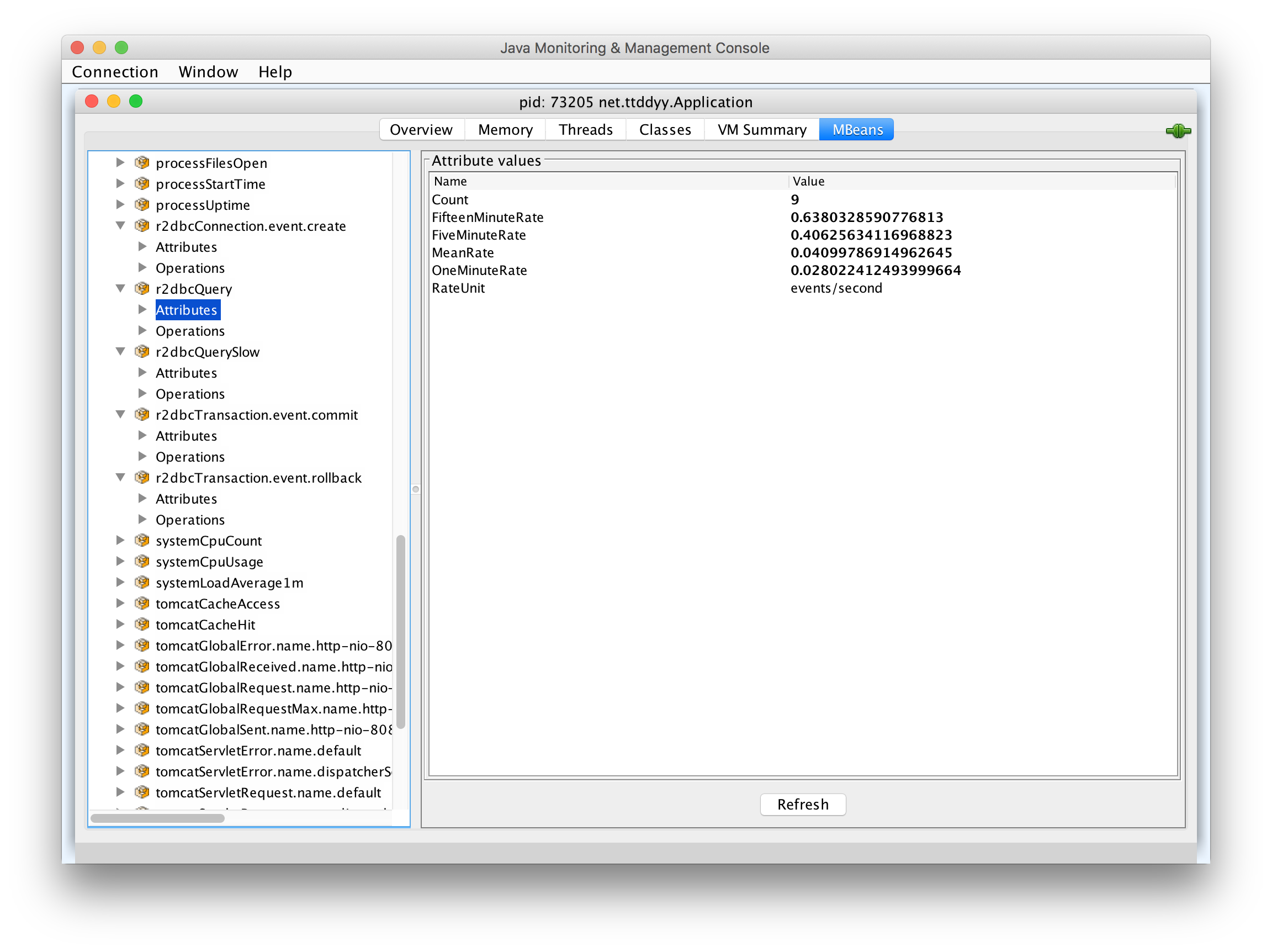
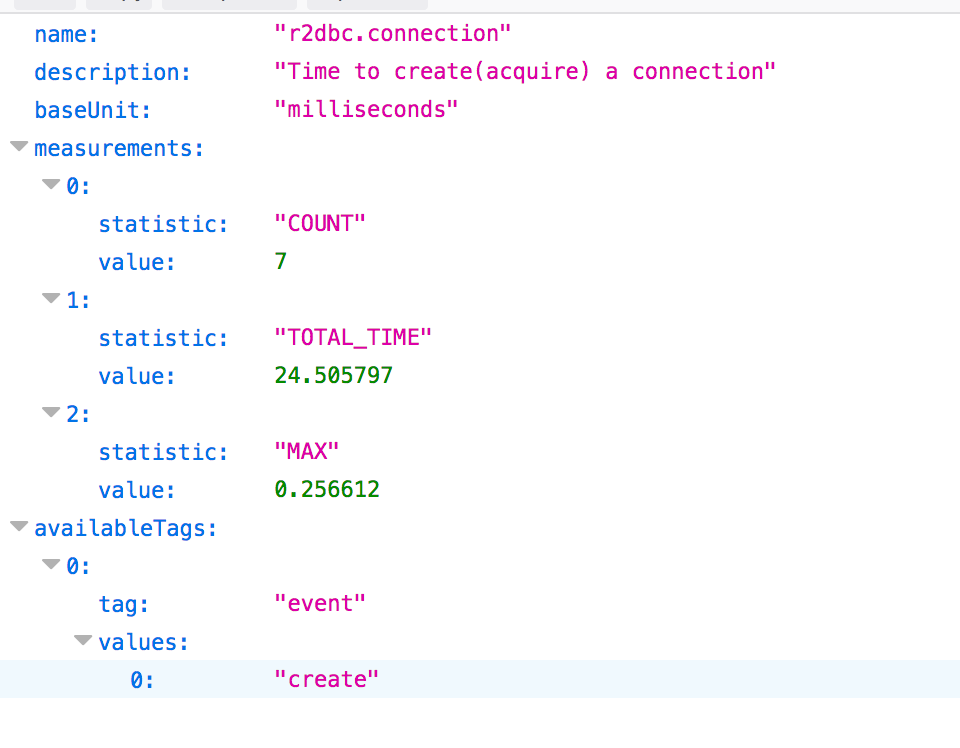
This sample MetricsExecutionListener implementation populates following metrics:
-
Time took to create a connection
-
Commit and rollback counts
-
Executed query count
-
Slow query count
In addition, this listener logs slow queries.
/actuator/metrics/r2dbc.transaction)6.5. Distributed Tracing
Construct tracing spans in appropriate callbacks.
6.5.1. Sample implementation
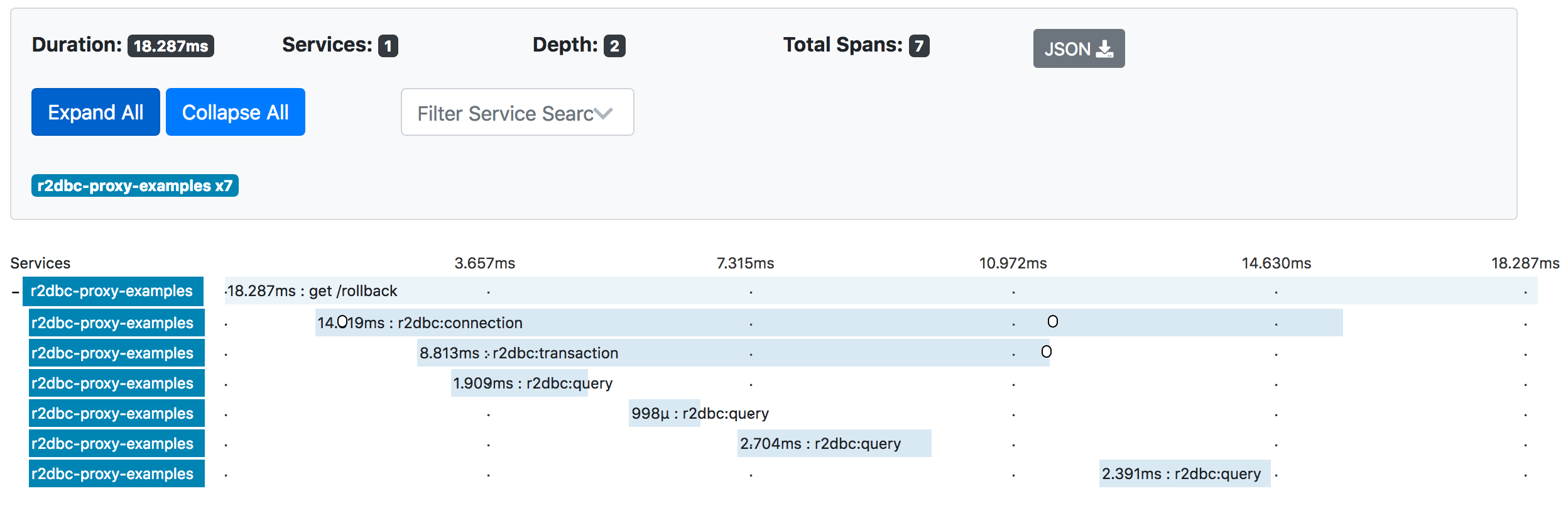
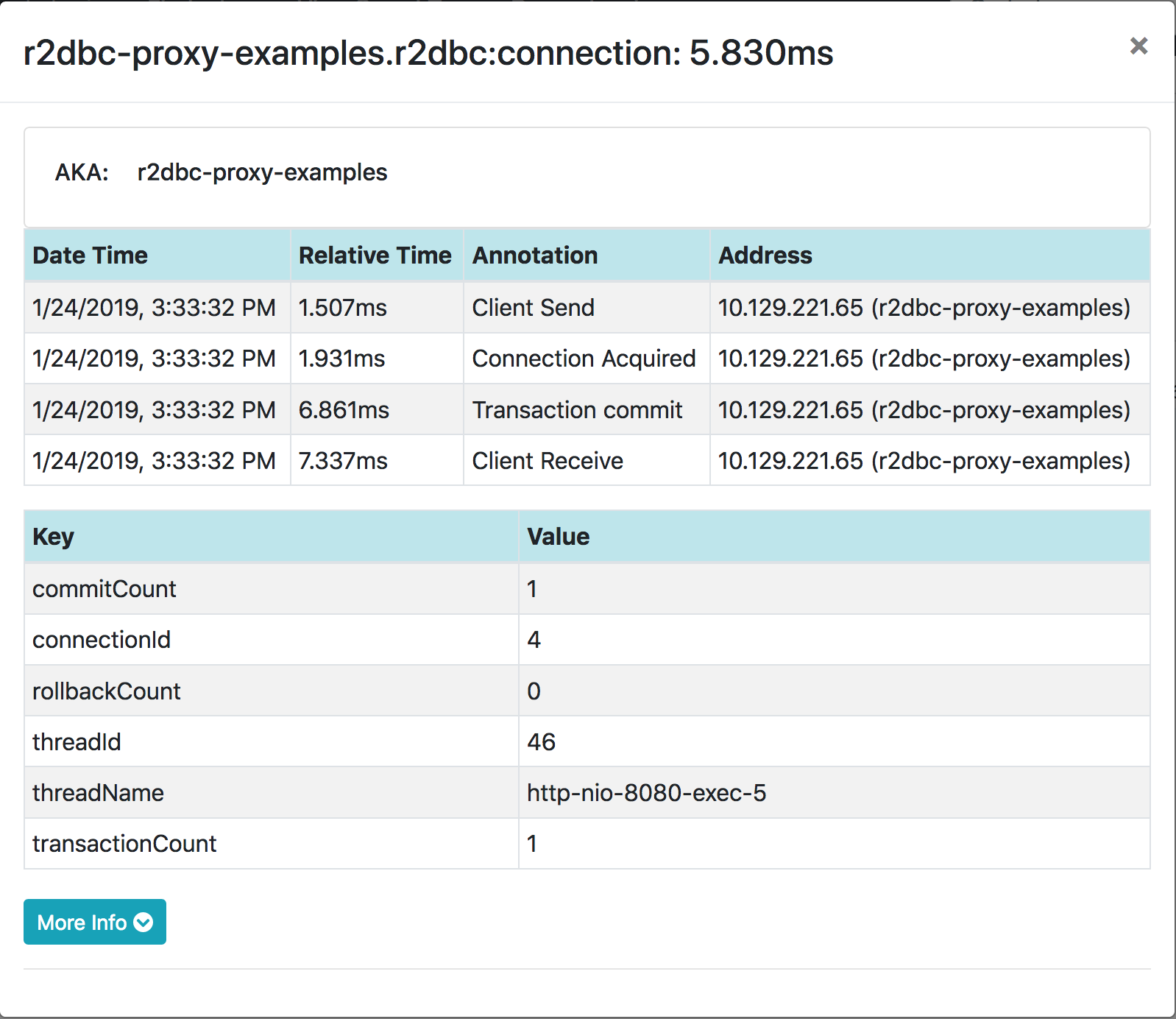
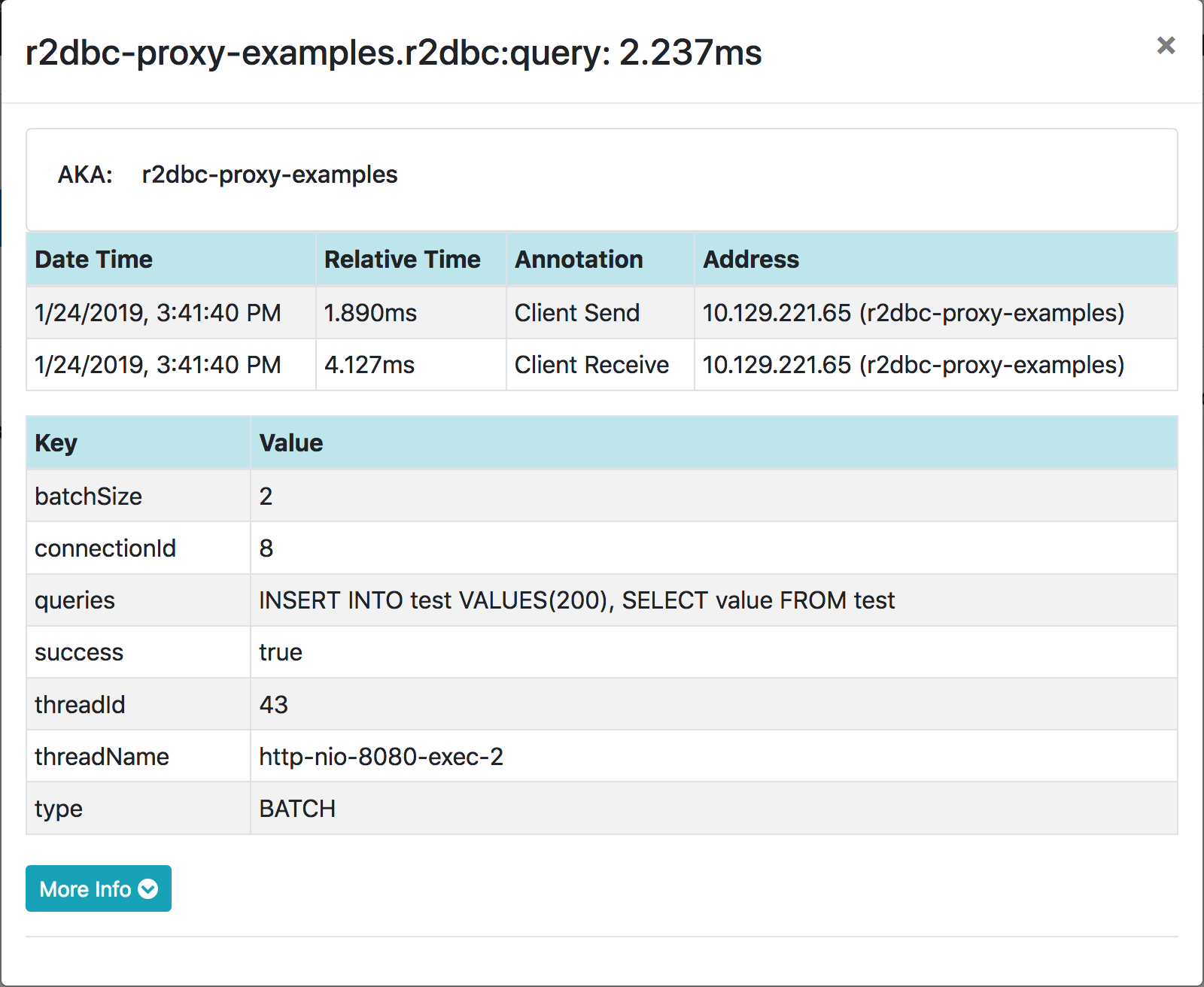
This sample TracingExecutionListener implementation creates spans.
6.6. Assertion/Verification
By inspecting invoked methods and/or executed queries, you can verify whether the logic you inspect has performed as expected.
For example, by keeping track of connection open/close method calls, connection leaks can be detected or verified.
Another example is to check the group of queries is executed on the same connection. This verifies the premise of the transaction - same connection needs to perform the queries in order for them to be in the same transaction.
6.7. Own Action (Custom Listener)
Users can write own callback logic that performs any actions, such as audit logging, sending notifications, calling external system, etc.
6.7.1. Implementing custom listener
In order to create a custom listener, simply implement ProxyExecutionListener or ProxyMethodExecutionListener
interface.
static class MyListener implements ProxyMethodExecutionListener {
	@Override
	public void afterCreateOnConnectionFactory(MethodExecutionInfo methodExecutionInfo) {
		System.out.println("connection created");
	}
}
6.8. Support Primitive and Null in Result Mapping
To consume query results, Result#map method accepts a mapping function(BiFunction) that takes Row and RowMetadata.
result.map((row, rowMetadata) -> row.get("name", String.class));The Row#get method takes a Class in the second argument to represent the returning value type(data type).
R2DBC spec does not support primitive types for this data type. Only boxed(wrapper) types are supported.
ResultRowConverter can provide support for primitive types by modifying the Row#get behavior.
The following converter transforms a primitive to a corresponding wrapper data type.
(e.g. row.get(0, int.class) to row.get(0, Integer.class))
Also, this converter handles null return value.
ResultRowConverter converter = (proxyRow, method, args, getOperation) -> {
    if (args.length == 2 && ((Class<?>) args[1]).isPrimitive()) {
        Class<?> boxedType = getWrapperType(args[1]);
        Object result = proxyRow.get((int) args[0], boxedType);
        if (result == null) {
            return getDefaultValue(boxedType);  // null handling
        }
        return result;
    }
    return getOperation.proceed();
};
// implement `getWrapperType()` and `getDefaultValue()` with own strategy

// register to the ProxyConfig
ProxyConfig proxyConfig = ProxyConfig.builder().resultRowConverter(converter).build();
6.9. Call different methods in Result Mapping
By modifying the Row#get behavior with ResultRowConverter, the following converters support column names that do not exist.
ResultRowConverter converter = (proxyRow, method, args, getOperation) -> {
   if ("full_name".equals(args[0])) {
       String firstName = proxyRow.get("first_name", String.class);
       String lastName = proxyRow.get("last_name", String.class);
       return firstName + " " + lastName;
   }
   return getOperation.proceed();   // invoke original method
);ResultRowConverter converter = (proxyRow, method, args, getOperation) -> {
if ("column_old".equals(args[0])) {
if (args.length == 1) {
return proxyRow.get("column_new");
}
return proxyRow.get("column_new", (Class<?>)args[1]);
}
return getOperation.proceed(); // invoke original method
);7. Features
7.1. Accessing reactor context values
In the callbacks, ValueSource contains a reactor’s ContextView object under ContextView.class key.
This provides a readonly access to the reactor context.
@Override
public void beforeQuery(QueryExecutionInfo execInfo) {
    // query execution scoped context
    ContextView contextViewForQuery = execInfo.getValueStore().get(ContextView.class, ContextView.class);
    // connection scoped context
    ContextView contextViewForConnection = execInfo.getConnectionInfo().getValueStore().get(ContextView.class, ContextView.class);
    // ...
}
7.1.1. Available ContextView scopes
While interacting with R2DBC APIs, there are multiple places that could put values into the reactor contexts. This example illustrates what context values are available in the corresponding callback APIs.
Mono.from(connectionFactory.create()).contextWrite(context -> context.put("foo", "FOO"))   (1)
    .flatMapMany(connection -> Mono.from(connection
        .createStatement("SELECT id, name FROM emp WHERE id = ?")
        .bind(0, 20)
        .execute()).contextWrite(context -> context.put("bar", "BAR")))    (2)
    .flatMap(result -> Mono.from(result
        .map((row, rowMetadata) -> row.get("name", String.class)))
        .contextWrite(context -> context.put("qux", "QUX"))    (3)
    )
    .contextWrite(context -> context.put("baz", "BAZ"))    (4)
...| 1 | Context for connection |
| 2 | Context for query execution |
| 3 | Context for result-set retrieval |
| 4 | Context for the entire flow |
BindParameterConverter#onCreateStatement
-
StatementInfo#getValueStorehas noContextView -
ConnectionInfo#getValueStorehas aContextViewthat holds keys -fooandbaz
BindParameterConverter#onBind
-
StatementInfo#getValueStorehas noContextView -
ConnectionInfo#getValueStorehas aContextViewthat holds keys -fooandbaz
ProxyExecutionListener#[before|after]Query
-
QueryExecutionInfo#getValueStorehas aContextViewthat holds keys -barandbaz -
ConnectionInfo#getValueStorehas aContextViewthat holds keys -fooandbaz
ProxyExecutionListener#[before|after]Method
-
MethodExecutionInfo#getValueStoreforcreatehas aContextViewthat holds keys -fooandbaz -
MethodExecutionInfo#getValueStoreforcreateStatementhas noContextView -
MethodExecutionInfo#getValueStoreforbindhas noContextView -
MethodExecutionInfo#getValueStoreforexecutehas aContextViewthat holds keys -barandbaz -
MethodExecutionInfo#getValueStoreformaphas aContextViewthat holds keys -bazandqux -
MethodExecutionInfo#getValueStoreforgethas noContextView -
ConnectionInfo#getValueStorefor all methods(create,createStatement,bind,execute,map,get) have aContextViewthat holds keys -fooandbaz
7.2. Micrometer Observation support
R2DBC Proxy has an optional dependency on Micrometer to provide Micrometer Observation support.
The ObservationProxyExecutionListener creates observations for query executions.
ConnectionFactory connectionFactory = ...
ObservationRegistry observationRegistry = ...
String r2dbcUrl = ...

ObservationProxyExecutionListener listener = new ObservationProxyExecutionListener(
observationRegistry, connectionFactory, r2dbcUrl);
listener.setIncludeParameterValues(true);  // to include binding params (default is false)

ConnectionFactory proxyConnectionFactory = ProxyConnectionFactory.builder(connectionFactory)
.listener(listener).build();
All Micrometer Observation implementation classes are located under the io.r2dbc.proxy.observation package.
Since the dependency is optional, users need to explicit add the micrometer-observation dependency.
For Spring Boot 3, a separate project, TBD, provides auto-configuration for this.
7.2.1. Observability - Conventions
Below you can find a list of all GlobalObservationConvention and ObservationConvention declared by this project.
ObservationConvention Class Name |
Applicable ObservationContext Class Name |
|
|
|
|
|
Virtual Thread Environment
The default In a virtual thread environment, each thread has a unique name. As a result, tagging thread names as a low-cardinality key-value can lead to cardinality explosion in tracing backends. To avoid this, use |
7.2.2. Observability - Metrics
Below you can find a list of all metrics declared by this project.
R2dbc Query Observation
R2DBC Query Observation.
Metric name r2dbc.query (defined by convention class io.r2dbc.proxy.observation.QueryObservationConvention). Type timer.
Metric name r2dbc.query.active (defined by convention class io.r2dbc.proxy.observation.QueryObservationConvention). Type long task timer.
| KeyValues that are added after starting the Observation might be missing from the *.active metrics. |
Micrometer internally uses nanoseconds for the baseunit. However, each backend determines the actual baseunit. (i.e. Prometheus uses seconds)
|
Fully qualified name of the enclosing class io.r2dbc.proxy.observation.R2dbcObservationDocumentation.
All tags must be prefixed with r2dbc. prefix!
|
Name |
Description |
|
Name of the R2DBC connection. |
|
Name of the R2DBC thread. |
Since, events were set on this documented entry, they will be converted to the following counters.
7.2.3. Observability - Spans
Below you can find a list of all spans declared by this project.
R2dbc Query Observation Span
R2DBC Query Observation.
Span name r2dbc.query (defined by convention class io.r2dbc.proxy.observation.QueryObservationConvention).
Fully qualified name of the enclosing class io.r2dbc.proxy.observation.R2dbcObservationDocumentation.
All tags must be prefixed with r2dbc. prefix!
|
Name |
Description |
|
Name of the R2DBC connection. |
|
Query parameter values. (since the name contains |
|
Name of the R2DBC query. (since the name contains |
|
Name of the R2DBC thread. |
Name |
Description |
|
Retrieving query result. |